Repository navigation
Modern PC Settings not searched? #57

Description


According to the previous forum the search function also search the modern PC settings. Currently it's not showing up

Reacted by Eli
According to the previous forum the search function also search the modern PC settings. Currently it's not showing up
Activity
Ibuprophen commentedon Aug 3, 2018
It's probably me but, I've never heard of the term "Modern PC Settings"...
Are you referring to the specific Windows 10 PC Settings within the Windows Apps?
~Ibuprophen
vicjpapa commentedon Aug 4, 2018
I understand. I also just stole the term from the the previous forum's Start Menu Search Guide http://www.classicshell.net/forum/viewtopic.php?f=7&t=1588&sid=73121307cfe71d854cd013a12385367d
Regarding what you're asking, I'm not really sure what to call it but seems like description is correct. Here's another example of the difference in searching "Touch" in Classic vs. Default
coddec commentedon Aug 4, 2018
I have a feeling, it's due to changes made to windows 10, cause I'm still using version 4.3.1, which means it's not a bug introduced by new versions. Don't get me wrong, it's because I'm lazy and it still works... so I did not upgrade to latest dev builds...
Ibuprophen commentedon Aug 4, 2018
I see now... 👍
This is similar/same as (i believe a combination of) the following 2 issues:
#15
#4
I believe that this is a known issue, especially, for Windows 10 users.
~Ibuprophen
XenHat commentedon Aug 4, 2018
The same framework is involved, but the issues are unrelated.
EDIT: I installed Classic Shell v4.3.1 and the issue is still present. At least this isn't a bug from our changes.
Gittyperson commentedon Aug 4, 2018
I hope that when this resolved, the "old" settings will not be removed from the search results. Windows 10 still has duplicate setting controls and some are better handled in the old, Control Panel UI instead of the new "Settings" UI.
ge0rdi commentedon Aug 11, 2018
As a workaround you can add following folder (and its subfolders) to Windows Indexing locations (
Control panel -> Indexing options):%LOCALAPPDATA%\Packages\windows.immersivecontrolpanel_cw5n1h2txyewy\LocalState\Indexed\SettingsClassicShell/OpenShelluses Windows Indexing database to getPC settingslist.Though it seems standard Windows 10 start menu doesn't need this folder to be indexed. It shows modern Settings in search results by default.
So it should be possible to do this without explicitly adding the location to Indexing.☹️
But currently I don't know how to achieve it
vicjpapa commentedon Aug 14, 2018
My LocalState folder seems to be empty.
Ibuprophen commentedon Aug 15, 2018
I've never heard of a LocalState folder as being a part of the Menu Directories...
~Ibuprophen
ge0rdi commentedon Aug 15, 2018
@vicjpapa
What OS do you have?
Does official Windows start menu find those
Settingsitems if you look for them?vicjpapa commentedon Aug 15, 2018
@ibuprophen1 sorry I don't understand what you meant
@ge0rdi Windows 10 pro. Yes the official start menu can see it. Most of the screenshots above are from my own desktop
ge0rdi commentedon Aug 15, 2018
Then I have no clue how official start menu enumerates them☹️
You may try to google for
windows.immersivecontrolpanel_cw5n1h2txyewy\LocalStateorWindows 10 Settings not indexedto see if anything of it will help.Though most of the articles I found were dealing with state where official start menu wasn't showing Settings items. And many of them mentioned that particular folder (that also
ClassicShelllooks for).AveYo commentedon Aug 15, 2018
I've made a quickfix for now
Settings_to_StartMenu.bat
Script generates Start Menu - Prgrams - Settings - ... entries from known ms-settings commands.
Did not have the energy to research what .dll is used for localization, so it's hardcoded in English.
Results appear under Programs. Better than nothing, right?
17 remaining items
bonzibudd commentedon Aug 28, 2020
@ge0rdi
Wow. This is a great day to be an Open-Shell user! This is probably the most needed addition in years, I am so happy this is fixed! I'm running Windows version 20H2 and it works flawlessly. I also see this as a great opportunity for people to switch from using Classic Shell (It seems like a lot of people still are) and even another reason to switch from the Win10 or 8 menu. I don't have the technical knowledge to know how you would make a shell location entangle with the program, but it seems like a similar solution to what StartIsBack++ has come up with. Big thanks to everyone helping to keep this program alive.
ge0rdi commentedon Aug 29, 2020
Yes. I was inspired by StartIsBack++.
Once I had virtual shell folder with modern settings it was quite easy to plug it into
Open-Shell.Gaurav-Original-ClassicShellTester commentedon Aug 31, 2020
Not a big issue but can you look into why certain search terms don't produce a result in the Start menu (not even in Windows 10's own search) but if you directly search the Settings app, you get results?
For example I typed: 'microsoft account' (without quotes) into the Open Shell Start menu search box. No results (which is fine since the Windows 10 search also didn't show anything). But the Settings app shows the right result "Manage your account" page. Maybe it's something that can be improved further? Is the Settings app also searching further somewhere else?
Another example: I typed: ClearType. No results. But the Windows 10 Search/Cortana/Win+S shows 1 result. So does the Settings app. Where else is it searching?
I am on Windows 10 Enterprise, 1803 64-bit.
ge0rdi commentedon Aug 31, 2020
@anonimuos
Here is search result for

microsoft accounton my Win10 2004:So apparently you just need to update (quite old) Win10.
Yup. The same for me.
Windows search seems to find
Adjust ClearType textsetting in Control panel.I'll try to have a look why
Open-Shellis not able to find it. Since it should search also Control panel settings.Gaurav-Original-ClassicShellTester commentedon Aug 31, 2020
Oh ok so first issue I can fix by upgrading to Windows 10 latest, which I will do maybe after 20H2 or whenever it's "worth it". Actually the reason I am on 1803 is I use multiple monitors and all Windows 10 versions after 1803 have a nasty bug with dual monitors in DWM or some other component (I suspect it's in DWM) where the wrong maximized window (the one behind the focused/active one) is incorrectly closed when you click the X button on the active one.
Despite posting the bug in Feedback Hub, they haven't fixed it for 5 releases which is why actually I am on 1803 Enterprise (which is still supported, not that I care about updates or support anyway).
Adjust ClearType text doesn't exist in my 1803 All Tasks Control Panel folder. Maybe that's why. But I am sure it was there in some early releases. I was comparing a list of shortcuts I made from StartIsBack's Settings shell namespace extension on older Windows 10 to the current folder added by Open Shell and I found some tasks missing/removed by Microsoft.
Maybe Settings app is also looking into some shortcuts which it has stored internally in some DLL, not the "All Control Panel tasks" CLSID folder.
ge0rdi commentedon Aug 31, 2020
It is also not present in my
All Tasks Control Panel. So apparently it is not part ofControl panelas such.I really don't know where exactly
Settingsapp (and Windows search) looks for settings :(But it definitely uses settings described in
AllSystemSettings_{253E530E-387D-4BC2-959D-E6F86122E5F2}.xml.And on my machine there is record for
cttune.exe(seems this is the app that handlesAdjust ClearType textsetting) in that file.So it should be possible to use it somehow in
Open-Shell. Currently we are parsing just some of those settings (modern settings).Will have a look at this.
ge0rdi commentedon Aug 31, 2020
@anonimuos
I've added support for more settings from
AllSystemSettings_{253E530E-387D-4BC2-959D-E6F86122E5F2}.xml.You can check in out in this build.
Gaurav-Original-ClassicShellTester commentedon Sep 1, 2020
Great. Works on my Windows 10 2004 and 1803 (2 different PCs). Also I am trying all builds of Open Shell for now on Windows Windows 8.1 and Windows 7 for compatibility.
ge0rdi commentedon Sep 1, 2020
Thank you 👍
Gaurav-Original-ClassicShellTester commentedon Sep 12, 2020
Another adjacent issue that Microsoft has created - again, not a problem with Open Shell is: they have renamed "and" to & in Settings pages. Would it be possible for Open Shell to return results with '&' if the user types 'and' and vice versa? e.g. if I type "Apps and features" (due to muscle memory of Programs and Features), I get nothing.
ge0rdi commentedon Sep 12, 2020
@anonimuos
That's weird. Typing
apps and featureswill showApps & Featuresitem for me.Also looking for shorter
apps featuresworks well.bonzibudd commentedon Sep 25, 2020
Hi @ge0rdi
I found a small issue with the shell location. I noticed that because Open-Shell accesses that location for searches, it actually shows up in the "Frequent" section of File Explorer's jump list.
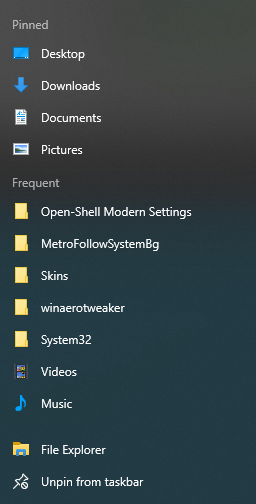
When I click the location, Explorer freezes and restarts. Hopefully this can be fixed so that the folder doesn't show up in the jump list.
ge0rdi commentedon Sep 26, 2020
@bonzibudd
Nice catch.
Fixed by 80c38d9 (build 4.4.159).
Search modern settings using our new shell folder